

Table of contents
The truth is, customers don’t care who solves their problem. They care that it is solved fast without repeating themselves. Automation through smarter tools and AI in customer support is the only way to deliver that consistently at scale.
In this guide, we are pulling apart customer support automation: what it really means and why companies lean on it. We will also show you how to set it up so it feels natural for customers and actually useful for teams.
What Is Customer Support Automation
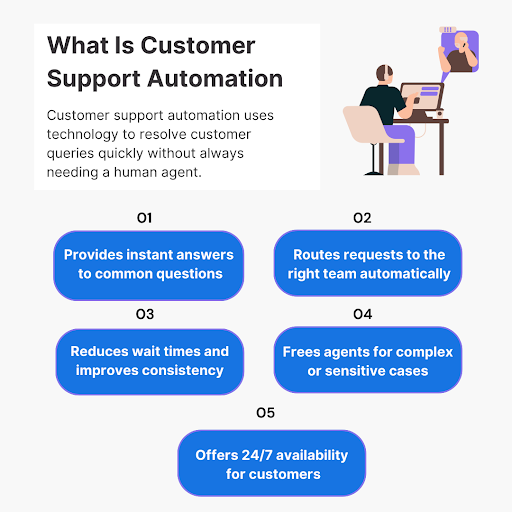
Customer support automation is the use of technology to handle and automate customer service tasks with little to no human involvement. Instead of waiting for an agent to respond, customers can get quick answers through automated systems that resolve common problems or route requests to the right department.
The goal isn’t to replace human support but to make it faster and more consistent while being available 24/7. Customer service agents then have more time to handle complex or sensitive issues, while customers enjoy quicker resolutions for everyday needs.
5 Major Types Of Customer Support Automation + Use Cases
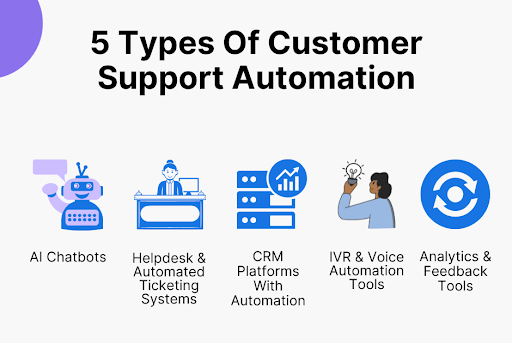
Customer support automation comes in flavors, and each type has its own role and strengths. Let’s break down the 5 big ones and see where they actually make sense.
1. AI Chatbots
Chatbots are usually the first thing people picture when they think about customer service automation. They have evolved way beyond scripted “yes/no” answers. Modern AI chatbots can understand intent, pull answers from knowledge bases, and even hand off a conversation to a human when it gets complicated.
Use case:
- Answering questions like “What are your hours?” or “Where’s my order?”
- Collecting customer info (name, order ID, issue type) before connecting them to a human.
- Walking customers through simple troubleshooting (e.g., resetting a password).
2. Helpdesk & Automated Ticketing Systems
These are the backbone of automated support. Helpdesk software logs every request and auto-routes tickets to the right department. They also use triggers to send quick updates so customers aren’t left hanging.
Use case:
- Prioritizing urgent issues (like service outages) over routine ones.
- Routing tickets to the right department (billing vs. technical support).
- Keeping customers updated automatically about their case progress.
3. CRM Platforms With Automation
CRM platforms aren’t just about sales anymore. Many now come with automation features that connect customer data to support actions. That means personalized responses and non-robotic follow-ups because they are tied to customer history.
Use case:
- Automatically logging customer conversations across email, chat, and social media.
- Triggering follow-up emails after a case is closed.
- Flagging high-value customers for priority support.
4. IVR & Voice Automation Tools
The old “press 1 for this, press 2 for that” system still exists, but it is smarter now. IVR (Interactive Voice Response) tools can recognize speech and route calls based on what a customer actually says, not just what they press.
Use case:
- Directing calls to the right agent or department instantly.
- Offering self-service options like account balance checks or order tracking.
- Reducing wait times by handling simple customer requests without a live agent.
5. Analytics & Feedback Tools
Analytics and feedback systems track performance and collect insights. They automate the process of gathering customer feedback and analyzing support data, which helps teams improve service quality over time.
Use case:
- Sending automated post-support surveys.
- Identifying recurring issues through ticket trends.
- Measuring response times, resolution rates, and customer satisfaction scores.
How To Implement Customer Support Automation: 7 Strategies That Work

Done well, automated customer service saves time and keeps clients happy. Here’s how to make that happen
1. Identify Support Areas That Need Automation
Before you even touch automated customer service tools or bots, pause. Step back and look at what is happening in your support system right now.
Start by mapping out the customer journey: from the first interaction to resolution. Look for patterns. Are customers constantly asking the same 3 questions over and over? Are there ticket types that take hours to handle but follow a predictable process? Those are golden automation opportunities.
Next, prioritize. Not every repetitive task is worth automating. Focus on areas that:
- Eat up your team’s time.
- Are highly repetitive.
- Follow a clear, rule-based process.
What To Do:
- Track ticket volume for a month.
- Categorize tickets into repetitive vs unique.
- Highlight the top 3 categories for automation impact.
2. Select The Right Tools For Your Business
Once you know what needs automation, it is time to pick how you will automate. But off-the-shelf automated customer service software never covers everyone’s needs. Look for tools that:
- Fit your current customer service workflow without forcing you to overhaul everything.
- Scale with your business growth.
- Integrates with systems you already use (CRM, helpdesk, chat apps).
Don’t get blinded by flashy AI features in the customer service automation software. Ask yourself: “Will this actually solve my ticket volume problem or just make my team click buttons differently?”
Also, think about the type of automation you want. For example:
- Chatbots for handling instant, repetitive customer inquiries.
- Helpdesk automation to route tickets and set up SLA reminders.
- CRM automations for follow-ups or tracking recurring issues.
What To Do:
- List must-have features based on your ticket analysis.
- Test 2–3 customer service automation tools in a pilot environment.
- Check if they integrate with your current systems.
Smartsupp offers a unified customer service platform that combines live chat, chatbots, and AI tools, all accessible from a single dashboard. This means you can manage customer service interactions across various channels without jumping between different apps.
One of its standout features is the Mira AI Shopping Assistant, which can automatically resolve customer queries and provide automated customer service support instantly, even outside of business hours. This helps handle repetitive questions and allows your support team to focus on more complex issues.
Setting up Smartsupp is straightforward. Plus, with its mobile SDK, you can embed the chat widget directly into your app to enhance customer engagement on the go.
3. Start Small With FAQs & Simple Queries
Jumping straight into full-scale automation is a trap. Instead, start with the low-hanging fruit. FAQs and simple queries are perfect for your first automation tests.
Why start small? Because it lets you:
- Test how your customers interact with automation.
- Fine-tune responses and improve accuracy without high risk.
- Build confidence with your team before rolling out more complex automations.
Pick the top 5–10 questions that are asked most often. For each, write clear and friendly responses. Feed these into your chatbot or automation platform. Monitor how they handle customer interactions: are customers getting the answers they need? Are tickets dropping as expected?
Going all-in on automation from day one is a recipe for headaches. Especially if you are running an eCommerce store with niche products. The sheer number of products can be overwhelming, and every product comes with its own set of questions.
You can’t possibly cover every scenario right away. Try to do it all at once, and you will overwhelm your team and leave your customers even more confused.
If you are confused, let us explain with the example of this female display mannequin store. It is a fantastic niche business, but for a buyer, it is a lot to sort through. Do they go for a realistic mannequin with detailed facial features? Or a glossy abstract style that makes clothing stand out in a retail display?
Then come the practical questions: how durable are they, what is shipping like, how do you store them, and what if you are ordering ten for multiple locations? Without clear answers, buyers hesitate.
This is exactly why starting small with automation makes sense. Once those basics are running smoothly, you can slowly add more queries. Along the way, you will notice gaps. That is how you build a system that actually helps your customers and doesn’t drive your support team crazy.
What To Do:
- Identify the 5 most common customer questions.
- Create straightforward responses.
- Test them with a small group of users or internally.
4. Build a Strong Knowledge Base
Automation is only as good as the information you feed it. A solid knowledge base is the backbone of your automation strategy.
The more comprehensive and structured your knowledge base, the less customers need to reach out, and the more effective your automation becomes.
Here’s how to make it strong:
- Organize by topic. Customers shouldn’t have to search around to find it.
- Every time a new ticket comes in that exposes a gap, update the knowledge base.
- Include examples and visuals. GIFs or short videos explain faster than text alone.
Remember, a chatbot or ticket automation is only useful if it can pull from reliable, structured content. A weak knowledge base = weak automation.
A well-prepared knowledge base makes it easier for every business, but it matters even more if you are selling higher-investment, specialized products where customers have detailed questions before making a purchase. If your knowledge base isn’t ready, your team ends up answering the same questions over and over, and customers get frustrated waiting.
Nordvik is a perfect example of this done right. Their help section is easy to use and covers everything a buyer could want. Take HSA/FSA eligibility, for example – they clearly list down which products qualify and what documentation is needed.

On financing, they walk customers through the options without leaving anything up in the air. Warranty info is crystal clear, so buyers know exactly what is covered and for how long. For returns and refunds, the process is simple and transparent, so people aren’t left wondering if they are stuck with something they don’t want.
The best part is how everything is organized. Topics are easy to find, and explanations are written like a person is actually talking to you. This setup means automation tools like chatbots can answer most questions instantly, and customers hardly have to wait for a human agent.
What To Do:
- Audit current documentation and categorize it.
- Fill gaps with missing or outdated information.
- Use analytics to track which articles are most accessed and which questions still slip through.
5. Ensure Smooth Human Escalation Paths
Automation can take care of a lot, but people still need to step in for the messy stuff. If a customer is frustrated or dealing with something unusual, handing them off to a real person should be smooth and natural. If the bot just dumps them with a “you are on your own,” that is when customers get frustrated fast.
This becomes even more important when you think about changing demographics. If you are dealing with younger buyers, they are usually fine clicking around a knowledge base or poking through chatbot menus.
But when you shift to an older audience, the expectations are very different. Escalations to a real person happen more often, and the handoff has to feel effortless.
Take MedicalAlertBuyersGuide as an example. Here’s where smooth human escalation becomes critical: their audience is primarily older adults or caregivers shopping for aging parents. These are people who don’t want to waste time figuring out menus or waiting for an endless loop of bot responses. They want reassurance and a human touch.
Imagine someone comparing different medical alert systems. They might be looking at coverage in rural areas or unclear on how fall detection really works. A bot can point them to the right comparison page, but when the concern is emotional – like “Will this actually work if my mom falls in the garden?” – they need to talk to a person who can answer with empathy.
For MedicalAlertBuyersGuide, the solution isn’t just having the reviews and comparison charts online. It is making sure the escalation path is crystal clear. When the question turns personal, there should be a quick bridge to a human rep or support specialist who can guide them further.
Start by defining clear escalation rules. For example:
- Trigger human support if a query contains frustration keywords (“angry,” “cancel,” “problem”).
- Escalate automatically if the bot fails to resolve after 2–3 customer interactions.
- Prioritize escalated tickets in your helpdesk so they are handled immediately.
Then, make sure the handoff is smooth. The customer shouldn’t have to repeat themselves. Pass all context – conversation history, previous attempts, relevant account info – to the human agent.
What To Do:
- Define the top 5 conditions that require human intervention.
- Set up automated triggers in your system.
- Test escalation flows with real tickets to ensure context is preserved.
- Train your team to pick up escalated tickets instantly, with full visibility of the conversation.
6. Personalize Automated Interactions
Here’s the usual fail point for most companies: their bots feel robotic. Even automated messages need a human touch.
Start by using the data your systems already have: names, previous orders, interaction history, and preferences. A simple “Hi Linda, I see your last order hasn’t shipped yet. Here’s the status…” beats “Your order status is…” every time.
Also, consider tone and phrasing. Match your brand voice. If your company is casual and friendly, let the bot be a little chatty, not stiff. Small touches like confirming previous preferences (“I noticed you usually order the large size – want me to check that?”) make the interaction feel human.
What To Do:
- Pull customer data from your CRM to feed personalized scripts.
- Create templates for multiple responses and different scenarios.
- Test different tones and see which gets the best response rates.
- Regularly review interactions to spot where personalization can be improved.
7. Train & Continuously Update AI Models
Automation doesn’t run on autopilot forever. Natural Language Processing (NLP) models need constant tuning to stay sharp. Skip the updates, and the smallest change can make it stumble.
Let’s say you are using this AI call answering service. At first, it will probably just cover simple things like your business hours or a quick update on shipping. But the more calls it handles, the more patterns you start to notice.
Maybe a lot of people are phoning in to double-check delivery times for their area. Others might want to know if they can order a few products at once and still get a good rate. And then there are those calls where buyers just need reassurance about durability before pulling the trigger.
If you are not looking at those call logs and feeding them back into the AI, it is going to stay stuck at square one. The service only gets smarter when you keep teaching it with real-world conversations.
So, start by feeding your AI with real ticket data. Look for patterns in customer questions and responses. The more quality data it has, the better it gets at predicting and responding correctly. Pay attention to the quality of your data enrichment – clean and contextually rich data ensures the AI learns correctly and reduces errors over time.
Then, create a routine: review logs weekly or monthly. Identify failed interactions or repeated escalations. Update your training set to cover these gaps. Over time, your AI becomes smarter and more accurate.
What To Do:
- Gather recent ticket data for AI training.
- Set a regular review schedule to check bot performance.
- Update scripts and training data based on failed or escalated interactions.
- Monitor KPIs like resolution time, escalation rate, and customer experience to gauge improvement.
Why Businesses Are Turning To Customer Support Automation: 5 Key Benefits

If you have wondered why so many customer support teams are adopting automation, it comes down to 5 big wins.
1. 24/7 Customer Availability
People don’t wait until business hours to run into problems. If a customer forgets their password at midnight, they don’t want to email and wait until morning. Automation solves this by keeping personalized support available around the clock to meet customer expectations.
Why it matters:
- AI chatbots and self-service portals can handle common questions anytime.
- Customers get instant help, even if your customer service team is asleep.
- Your brand is “always on,” which builds trust and strengthens customer relationships.
2. Faster Response Times
Nobody enjoys waiting in a long queue for a simple question. Automation cuts that wait drastically by giving instant replies for common issues and routing complex ones straight to the right person.
Why it matters:
- Chatbots can answer FAQs instantly.
- Ticketing systems prioritize urgent cases so they don’t get stuck in line.
- Faster replies lead to higher customer retention and fewer escalations.
3. Lower Operational Costs
Hiring more support staff to cover 24/7 shifts or high ticket volume can get expensive fast. Automation handles the repetitive workload, so you don’t need to scale headcount at the same pace as customer demand.
Why it matters:
- Fewer agents are needed to handle basic queries.
- You save money on overtime or after-hours coverage.
- The team you already have can focus on complex, high-value cases.
4. Multi-Channel Support Coverage
With an increased use of chatbots in digital marketing, customers no longer stick to just one channel. They might DM you on Instagram or call your hotline – sometimes all in the same day. Automation keeps customer support processes organized and consistent across all those touchpoints.
Why it matters:
- Responses stay consistent no matter the channel.
- CRMs and ticketing systems log all interactions in one place.
- Customers don’t have to repeat themselves when switching platforms.
5. Reduced Human Error
Even the best support agents make mistakes — missing tickets, sending wrong info, forgetting to follow up. Automation handles the repetitive and procedural tasks with accuracy every time.
Why it matters:
- Automatic ticket routing prevents them from getting lost.
- Pre-set responses ensure customers get the correct information.
- Consistent follow-ups reduce the chance of unresolved issues.
5 Common Challenges & Limitations Of Customer Support Automation

Customer support automation pays off big, but it is not without its hurdles. Here are 5 of the biggest challenges and smart ways to solve them.
1. Difficulty Measuring ROI
Sometimes you automate, but you are not sure if it is actually saving time or improving satisfaction. Without clear metrics, it is hard to justify continued investment.
Solution: Define measurable KPIs from day one. Track things like average response time, number of tickets resolved without human intervention, escalation rates, and customer satisfaction scores for automated interactions. Regularly analyze trends and tweak customer service processes based on real data.
If you are struggling to understand the financial impact of automation, bring in a finance expert to connect the dots. They can model potential ROI and identify areas where automation is actually paying off or where it might need adjustment. Just having someone who can interpret the numbers correctly can make all the difference in deciding what to scale or change.
2. Bots Misunderstanding Customer Intent
Even the smartest AI sometimes takes a customer’s question too literally. Someone might type, “I can’t log in,” and the bot replies with a generic password reset link, ignoring that the real problem is an account lock.
Solution: Layer in context awareness. Feed the AI historical ticket data so it learns the nuances of how customers phrase problems. Implement a secondary check for ambiguous queries – if confidence in the answer is low, route to a human automatically.
3. Over-Automation Makes Customers Frustrated
You have seen it – chatbots that answer every question mechanically, leaving no room for flexibility. Customers start feeling trapped in a rigid loop, asking, “Can I speak to a human already?”
Solution: Build flexibility into the customer service operations. Even in automated responses, include options like “Talk to a human” or “Show me examples.” Think of automation as a helper towards building customer loyalty, not a jailer. Test the flow often: if customers frequently hit the “human” button, it is a sign your bot needs smarter branching.
4. Limited Problem-Solving Scope
Automation shines on simple, repeatable tasks, but complex problems still need humans. Relying too much on bots for tricky issues can lead to incorrect solutions or delayed responses.
Solution: Define boundaries clearly. Use automation strictly for what it can confidently handle, and tag edge cases for human review immediately. You can even set up “escalation triggers” based on keywords or patterns to make sure complex customer issues never linger in automated limbo.
5. Data Privacy & Security Concerns
Automating customer data interactions exposes sensitive information to more systems. A small misconfiguration can lead to leaks or unauthorized access, which is a nightmare for any brand.
Solution: Treat automation like any sensitive process. Encrypt all data flows, use role-based access, and run security audits specifically for automated systems. Also, clearly communicate to customers when bots are accessing their data, which builds trust instead of skepticism.
Conclusion
Customer support automation works best when it is purposeful. Don’t automate for the sake of tech bragging rights. Do it right, and it handles the grunt work and keeps customers from losing their minds. Automated customer support is the now. And the ones who treat it like a smart partner instead of a robot will win every time.
If you want to make customer support automation actually work without turning it into a headache, you should check out Smartsupp. It keeps all your chats, automated messages, and visitor tracking in one place, so you can jump in exactly when you need to. The interface is simple, and it actually makes handling support manageable instead of chaotic.
Sign up for free and see how customer support automation actually makes your life and your team’s way easier.